Converting Online Terms to Downgrades
Since online cancellation functionality was turned on in May 2025, we’ve seen many members submit a cancellation when in fact a membership downgrade was either what they were looking for, or what would be a better answer to their current needs.
Staff are supporting members to convert the submitted term to a downgrade the membership to the preferred type.
Here’s how to do it:
If the term has ALREADY PROCESSED…
Re-enroll in the preferred membership type, waiving the joiner fee and collecting the prorated payment for the month.
If the term is SCHEDULED…
1st Draft - cancellation submitted any time,
OR15th Draft - cancellation submitted between 15th - end of month (nothing in pending batch yet)
Release the scheduled term.
Downgrade the membership to the preferred type.
15th Draft - cancellation submitted between 1st - 14th of month (scheduled payment in the pending batch)
When the term was submitted between the 1st and 14th, the online term process would have pulled the fee from the pending batch, and you’ll see an alert like this:
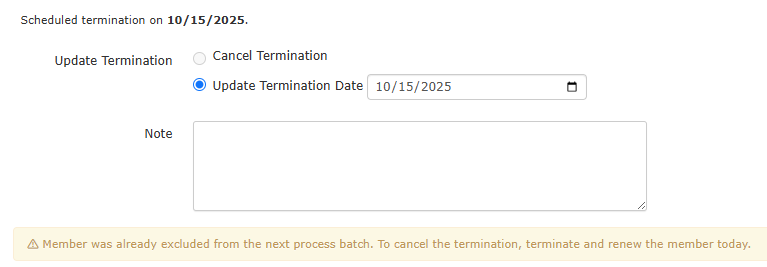
Update the term to TODAY; it will be effective immediately.
Re-enroll them in the preferred membership type, switching to drafting on the 1st. Use discount group to waive the joiner fee and prorated amount for the second half of the month (they’ve already paid for the first half of the month with last month’s dues on the 15th).
Note for the member that this will look like a renewal/new membership in the system so they may get an automated confirmation or welcome email - feel free to ignore!
Was this article helpful?
That’s Great!
Thank you for your feedback
Sorry! We couldn't be helpful
Thank you for your feedback
Feedback sent
We appreciate your effort and will try to fix the article